
Using S6 Overlay
The fpm-nginx and fpm-apache images use S6 Overlay to run PHP-FPM and the web server in one container. You can add your own long-running process, such as a worker, as another S6 service.
Why these images run two processes
NGINX and Apache serve static files and pass PHP requests to PHP-FPM. A PHP request needs both processes running. S6 Overlay is a process supervisor built for containers. It starts PHP-FPM and waits until it is ready before it starts the web server. It restarts either one if it crashes. If a service fails to start, S6 stops the container. The image's health check requests /healthcheck through the web server to PHP-FPM. When either process is down, the container reports unhealthy.
The other images don't use S6. cli runs your command, fpm runs php-fpm alone, and frankenphp serves PHP and static files from one process.
S6 Overlay compared to Supervisor
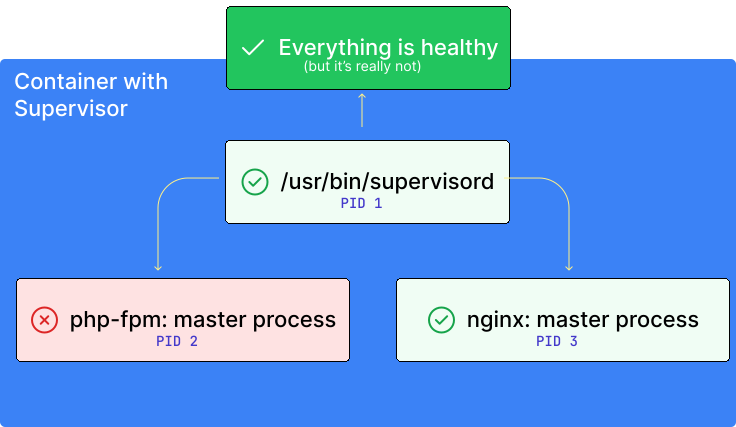
Supervisor also restarts child processes. It runs as PID 1 and wasn't built for containers. While a child process is failing, Supervisor keeps running, so the orchestrator still sees a healthy container.
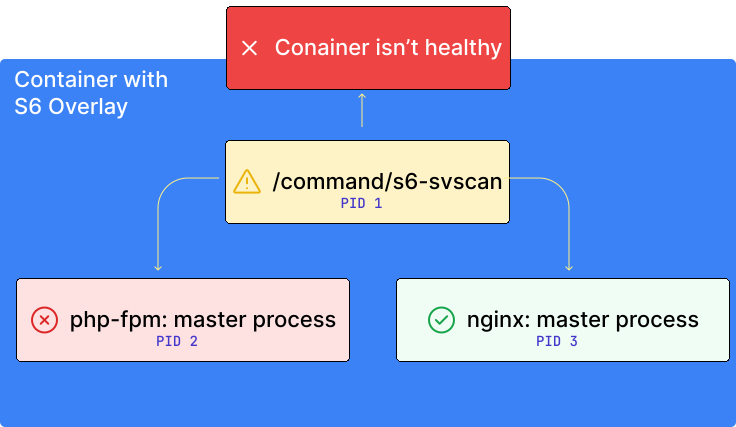
With S6 Overlay, a service that fails to start stops the container. A process that is down fails the health check.
How the container starts
docker-php-serversideup-entrypointruns every script in/etc/entrypoint.d/in order. See adding start up scripts for the list.- It starts S6 Overlay with
/init. - S6 starts the
php-fpmservice, thennginxorapache2, which depend onphp-fpm.
Every service starts after all the entrypoint scripts have finished.
Add a long-running service
An S6 service is a directory in /etc/s6-overlay/s6-rc.d/ with a type file, a run script, and a dependencies.d directory. This one runs a PHP script that never exits:
FROM serversideup/php:8.5-fpm-nginx

USER root

COPY --chmod=755 ./my-worker/ /etc/s6-overlay/s6-rc.d/my-worker/
RUN touch /etc/s6-overlay/user-bundles.d/user/contents.d/my-worker

USER www-data
typeislongrunfor a process S6 keeps running and restarts.runstarts the process.with-contenvpasses the container's environment variables to it, andexecreplaces the shell so S6 supervises PHP directly.- The empty
dependencies.d/basefile makes the service wait for S6's own setup, which S6 Overlay recommends for every service. - The empty file in
/etc/s6-overlay/user-bundles.d/user/contents.d/registers the service. S6 only starts services listed there.
user-bundles.d/user/contents.d/, not the older s6-rc.d/user/contents.d/. Since S6 Overlay 3.2.3.2, the old location makes startup try to write to /etc/s6-overlay, which fails as www-data, so the container doesn't boot. See upgrading to v5.The service runs as www-data, like the rest of the container.
Start a service between the startup scripts
Because the entrypoint scripts finish before S6 starts, a service can't run in the middle of them. If it needs to, for example a database proxy that must be up before 50-laravel-automations.sh runs migrations, convert the scripts to S6 services with docker-php-serversideup-s6-init:
FROM serversideup/php:8.5-fpm-nginx

USER root

# Your own startup scripts, if you have any
COPY --chmod=755 ./entrypoint.d/ /etc/entrypoint.d/
RUN docker-php-serversideup-s6-init

COPY --chmod=755 ./my-worker/ /etc/s6-overlay/s6-rc.d/my-worker/
RUN touch /etc/s6-overlay/user-bundles.d/user/contents.d/my-worker

USER www-data
docker-php-serversideup-s6-init must run as root. It:
- Moves every script from
/etc/entrypoint.d/to/etc/s6-overlay/scripts/and makes each one an S6 oneshot service named after the file without.sh. For example,10-init-webserver-config.shbecomes10-init-webserver-config. - Chains the oneshots so they run in the same order the entrypoint would have used.
- Makes
php-fpm,nginx, andapache2wait for the last oneshot. - Can run again in an image built from yours. New scripts join the existing order, and a script with the same name replaces the earlier one.
Copy your startup scripts into /etc/entrypoint.d/ before you run it. Scripts added afterward run from the entrypoint before S6 starts.
Your service can now depend on any script by name. Add an empty file for each dependency:
mkdir -p my-worker/dependencies.d
touch my-worker/dependencies.d/base
touch my-worker/dependencies.d/10-init-webserver-config
To make a script wait for your service instead, add a file named after your service to that script's dependencies.d in a RUN step after docker-php-serversideup-s6-init:
RUN touch /etc/s6-overlay/s6-rc.d/50-laravel-automations/dependencies.d/my-worker
S6 counts a longrun service as up as soon as its run script starts. Your process may still be starting when the script runs.